Tuesday, July 28, 2020

Developing as an Intro Developer

July‌ ‌28,‌ ‌2020‌ ‌

I‌ ‌am‌ ‌going‌ ‌to‌ ‌delve‌ ‌into‌ ‌learning‌ ‌to‌ ‌program.‌ ‌I’ll‌ ‌start‌ ‌by‌ ‌attempting‌ ‌to‌ ‌fix‌ ‌one‌ ‌of‌ ‌our‌ ‌websites,‌ ‌or‌ ‌ rather‌ ‌updating‌ ‌the‌ ‌drupal‌ ‌releases‌ ‌on‌ ‌all‌ ‌of‌ ‌them‌ ‌to‌ ‌the‌ ‌latest‌ ‌releases.‌ ‌This‌ ‌always‌ ‌causes‌ ‌me‌ ‌ a‌ ‌lot‌ ‌of‌ ‌anxiety,‌ ‌as‌ ‌I‌ ‌have‌ ‌deleted‌ ‌things‌ ‌in‌ ‌the‌ ‌past,‌ ‌including‌ ‌databases,‌ ‌and‌ ‌therefore‌ ‌entire‌ ‌ websites.‌ ‌

‌ I‌ ‌learned‌ ‌Visual‌ ‌Basic‌ ‌a‌ ‌long,‌ ‌long‌ ‌time‌ ‌ago‌ ‌in‌ ‌a‌ ‌college‌ ‌class.‌ ‌When‌ ‌I‌ ‌met‌ ‌my‌ ‌partner,‌ ‌he‌ ‌ introduced‌ ‌me‌ ‌to‌ ‌Claris‌ ‌Home‌ ‌Page‌ ‌and‌ ‌we‌ ‌built‌ ‌websites‌ ‌using‌ ‌that‌ ‌program.‌ ‌I‌ ‌discovered‌ ‌ w3schools‌ ‌and‌ ‌learned‌ ‌a‌ ‌bit‌ ‌of‌ ‌html‌ ‌and‌ ‌saw‌ ‌that‌ ‌the‌ ‌html‌ ‌Claris‌ ‌Home‌ ‌Page‌ ‌created‌ ‌wasn’t‌ ‌as‌ ‌ clean‌ ‌as‌ ‌that‌ ‌mentioned‌ ‌in‌ ‌the‌ ‌w3schools‌ ‌tutorials.‌ ‌Around‌ ‌that‌ ‌time‌ ‌I‌ ‌went‌ ‌to‌ ‌a‌ ‌mashupcamp/‌ ‌ barcamp.‌ ‌I‌ ‌migrated‌ ‌to‌ ‌using‌ ‌drupal‌ ‌for‌ ‌our‌ ‌websites‌ ‌based‌ ‌on‌ ‌the‌ ‌recommendation‌ ‌of‌ ‌someone‌ ‌ there.‌ ‌ ‌

‌ ‌ That’s‌ ‌when‌ ‌I‌ ‌felt‌ ‌I‌ ‌stopped‌ ‌developing‌ ‌as‌ ‌a‌ ‌potential‌ ‌developer.‌ ‌I‌‌ ‌‌didn’t‌ ‌know‌ ‌anything‌ ‌about‌ ‌ php‌ ‌and‌ ‌I‌ ‌still‌ ‌don't‌ ‌know‌ ‌php‌ ‌.‌ ‌It’s‌ ‌like‌ ‌I‌ ‌can‌ ‌read‌ ‌the‌ ‌language,‌ ‌but‌ ‌not‌ ‌understand‌ ‌what‌ ‌it‌ ‌ means.‌ ‌‌I‌ ‌feel‌ ‌the‌ ‌same‌ ‌way‌ ‌about‌ ‌‌CSS.‌‌ ‌‌I‌‌ ‌‌dabbled‌ ‌with‌ ‌some‌ ‌tutorials,‌ ‌but‌ ‌I‌ ‌haven’t‌ ‌really‌ ‌built‌ ‌ anything.‌‌ ‌

‌ ‌‌‌ ‌ ‌ Whenever‌ ‌I‌ ‌have‌ ‌to‌ ‌do‌ ‌web‌ ‌development,‌ ‌or‌ ‌rather‌ ‌website‌ ‌troubleshooting‌ ‌on‌ ‌these‌ ‌drupal‌ ‌ sites,‌ ‌or‌ ‌any‌ ‌sites‌ ‌that‌ ‌were‌ ‌created‌ ‌with‌ ‌my‌ ‌partner,‌ ‌I‌ ‌get‌ ‌anxious.‌ ‌I‌ ‌postpone‌ ‌any‌ ‌work‌ ‌until‌ ‌ absolutely‌ ‌necessary.‌ ‌I‌ ‌know‌ ‌this‌ ‌is‌ ‌not‌ ‌the‌ ‌approach‌ ‌I‌ ‌should‌ ‌take,‌ ‌I’ve‌ ‌let‌ ‌anxiety‌ ‌take‌ ‌over.‌ ‌

‌ ‌ At‌ ‌the‌ ‌same‌ ‌time,‌ ‌I‌ ‌have‌ ‌a‌ ‌romantic‌ ‌vision‌ ‌of‌ ‌web‌ ‌development‌ ‌and‌ ‌technology‌ ‌in‌ ‌general.‌ ‌I‌ ‌ believe‌ ‌technology‌ ‌can‌ ‌solve‌ ‌many‌ ‌of‌ ‌the‌ ‌social‌ ‌ills‌ ‌in‌ ‌the‌ ‌world‌ ‌and‌ ‌I‌ ‌want‌ ‌to‌ ‌be‌ ‌part‌ ‌of‌ ‌that‌ ‌ change.‌ ‌So,‌ ‌I‌ ‌need‌ ‌to‌ ‌take‌ ‌a‌ ‌deep‌ ‌breath‌ ‌and‌ ‌dive‌ ‌in.‌ ‌This‌ ‌time.‌ ‌I‌ ‌am‌ ‌going‌ ‌to‌ ‌try‌ ‌to‌ ‌do‌ ‌a‌ ‌better‌ ‌ job‌ ‌of‌ ‌documenting‌ ‌my‌ ‌work,‌ ‌including‌ ‌how‌ ‌I‌ ‌feel‌ ‌so‌ ‌I‌ ‌can‌ ‌return‌ ‌to‌ ‌this‌ ‌in‌ ‌the‌ ‌future.‌ ‌

‌ ‌ Alright,‌ ‌so‌ ‌the‌ ‌problem‌ ‌is‌ ‌that‌ ‌I‌ ‌need‌ ‌to‌ ‌upload/‌ ‌upgrade‌ ‌to‌ ‌the‌ ‌latest‌ ‌release‌ ‌of‌ ‌Drupal‌ ‌for‌ ‌our‌ ‌ websites.‌ ‌The‌ ‌current‌ ‌model‌ ‌is‌ ‌8‌ ‌and‌ ‌I‌ ‌need‌ ‌to‌ ‌migrate‌ ‌to‌ ‌9.‌ ‌I‌ ‌know‌ ‌this‌ ‌will‌ ‌be‌ ‌a‌ ‌bigger‌ ‌job.‌ ‌

‌ ‌ Downloaded‌ ‌drupal-9.0.2.zip‌ ‌from‌ ‌drupal‌ ‌website‌ ‌

‌ ‌ First,‌ ‌I‌ ‌should‌ ‌back‌ ‌everything‌ ‌up…‌ ‌ Logged‌ ‌into‌ ‌our‌ ‌webhost‌ ‌(which‌ ‌I‌ ‌hate,‌ ‌just‌ ‌saying-‌ ‌part‌ ‌of‌ ‌that‌ ‌is‌ ‌because‌ ‌I‌ ‌tried‌ ‌to‌ ‌learn‌ ‌Ruby‌ ‌ on‌ ‌Rails‌ ‌and‌ ‌was‌ ‌really‌ ‌enjoying‌ ‌it‌ ‌and‌ ‌couldn’t‌ ‌deploy‌ ‌it‌ ‌on‌ ‌this‌ ‌cheap‌ ‌webhost-I‌ ‌stuck‌ ‌with‌ ‌the‌ ‌ webhost‌ ‌and‌ ‌stopped‌ ‌learning‌ ‌Ruby‌ ‌on‌ ‌Rails-‌ ‌penny‌ ‌wise‌ ‌and‌ ‌pound‌ ‌foolish).‌ ‌

‌ ‌ Went‌ ‌to‌ ‌actual‌ ‌domain/website‌ ‌and‌ ‌it‌ ‌appears‌ ‌to‌ ‌not‌ ‌have‌ ‌ANYTHING.‌ ‌ “No‌ ‌front‌ ‌page‌ ‌content‌ ‌has‌ ‌been‌ ‌created‌ ‌yet…”‌ ‌

‌ ‌ OK,‌ ‌this‌ ‌is‌ ‌strange.‌ ‌I‌ ‌need‌ ‌to‌ ‌find‌ ‌any‌ ‌content‌ ‌that‌ ‌was‌ ‌created,‌ ‌and‌ ‌maybe‌ ‌use‌ ‌this‌ ‌as‌ ‌an‌ ‌ opportunity‌ ‌to‌ ‌move‌ ‌away‌ ‌from‌ ‌drupal,‌ ‌at‌ ‌least‌ ‌for‌ ‌this‌ ‌website.‌ ‌

‌ ‌ I‌ ‌started‌ ‌looking‌ ‌for‌ ‌the‌ ‌foling‌ ‌that‌ ‌used‌ ‌to‌ ‌appear‌ ‌on‌ ‌their‌ ‌older‌ ‌dashboard.‌ ‌I‌ ‌think‌ ‌it’s‌ ‌because‌ ‌I‌ ‌ go‌ ‌through‌ ‌a‌ ‌different‌ ‌registrar‌ ‌and‌ ‌use‌ ‌them‌ ‌for‌ ‌hosting‌ ‌only‌ ‌(again‌ ‌penny‌ ‌wise…).‌ ‌

‌ ‌ I‌ ‌saw‌ ‌an‌ ‌ad‌ ‌for‌ ‌inMotion‌ ‌Hosting‌ ‌on‌ ‌Filezilla...I’ve‌ ‌also‌ ‌heard‌ ‌of‌ ‌netlify‌ ‌and‌ ‌Blue‌ ‌Host...I‌ ‌may‌ ‌ definitely‌ ‌be‌ ‌looking‌ ‌for‌ ‌a‌ ‌new‌ ‌host.‌ ‌So‌ ‌frustrated!‌ ‌

‌ ‌ Got‌ ‌the‌ ‌link‌ ‌I‌ ‌needed‌ ‌to‌ ‌the‌ ‌control‌ ‌panel.‌ ‌ Figured‌ ‌out‌ ‌the‌ ‌folder‌ ‌to‌ ‌which‌ ‌the‌ ‌domain‌ ‌was‌ ‌pointing‌ ‌ Had‌ ‌to‌ ‌Enable‌ ‌FTP‌ ‌in‌ ‌the‌ ‌webhost‌ ‌ Created‌ ‌a‌ ‌very‌ ‌rudimentary‌ ‌basic‌ ‌index.html‌ ‌file‌ ‌ Installed‌ ‌a‌ ‌new‌ ‌version‌ ‌of‌ ‌Filezilla‌ ‌ When‌ ‌I‌ ‌connected‌ ‌through‌ ‌Filezilla-‌ ‌message-‌ ‌“This‌ ‌server‌ ‌does‌ ‌not‌ ‌support‌ ‌FTP‌ ‌over‌ ‌TLS‌ ‌-‌ ‌If‌ ‌ you‌ ‌continue‌ ‌password‌ ‌and‌ ‌files‌ ‌will‌ ‌be‌ ‌sent‌ ‌in‌ ‌clear‌ ‌over‌ ‌the‌ ‌internet..”‌ ‌I’m‌ ‌not‌ ‌sure‌ ‌I‌ ‌want‌ ‌to‌ ‌do‌ ‌ that…‌ ‌let’s‌ ‌try‌ ‌a‌ ‌different‌ ‌way.‌ ‌

‌ ‌ Navigated‌ ‌to‌ ‌File‌ ‌Management‌ ‌in‌ ‌the‌ ‌webhost‌ ‌control‌ ‌panel.‌ ‌ Deleted‌ ‌directory‌ ‌including‌ ‌all‌ ‌files.‌ ‌ That‌ ‌was‌ ‌tricky,‌ ‌as‌ ‌I‌ ‌had‌ ‌to‌ ‌change‌ ‌permissions‌ ‌on‌ ‌some‌ ‌files.‌ ‌ ‌ I‌ ‌ended‌ ‌up‌ ‌creating‌ ‌a‌ ‌new‌ ‌foder‌ ‌to‌ ‌which‌ ‌the‌ ‌domain‌ ‌is‌ ‌pointing.‌ ‌This‌ ‌is‌ ‌where‌ ‌my‌ ‌current‌ ‌ webhost‌ ‌makes‌ ‌it‌ ‌really‌ ‌frustrating.‌ ‌I’.m‌ ‌having‌ ‌to‌ ‌go‌ ‌through‌ ‌chat‌ ‌support‌ ‌just‌ ‌to‌ ‌access‌ ‌the‌ ‌ pointers‌ ‌and‌ ‌subdomains‌ ‌page-‌ ‌somethlder,‌ ‌uploaded‌ ‌the‌ ‌basic‌ ‌html‌ ‌file‌ ‌into‌ ‌the‌ ‌folder‌ ‌and‌ ‌ pointed‌ ‌the‌ ‌domain‌ ‌to‌ ‌the‌ ‌folder.‌ ‌

‌ ‌ Well‌ ‌the‌ ‌site‌ ‌is‌ ‌pointing‌ ‌to‌ ‌my‌ ‌rather‌ ‌pathetic‌ ‌index.html‌ ‌page,‌ ‌but‌ ‌at‌ ‌least‌ ‌I‌ ‌understand‌ ‌it,‌ ‌unlike‌ ‌ drupal.‌ ‌This‌ ‌is‌ ‌a‌ ‌good‌ ‌start‌ ‌for‌ ‌today.‌ ‌I’ll‌ ‌start‌ ‌venturing‌ ‌in‌ ‌more‌ ‌tomorrow.‌ ‌Thanks‌ ‌for‌ ‌reading.‌ ‌

Monday, August 22, 2016

Reflecting on Teaching Writing

I want to be a better writing teacher. That is an area in which I feel I really struggle. I attended trainings with David Matteson at our school district 2013-2015 for intermediate grades. Even though I understand his trainings for primary grades are phenomenal, I felt that the training for intermediate grades did not have too much impact on my students’ ability to write well. So much of his focus was on planning before you write, which is definitely an important process. Yet, I find that I often do not plan what I write most of the time. I prefer a more free-flowing form of writing, at least when it comes to writing reflectively. This summer, I started reading “What You Know by Heart: How to Develop Curriculum for Your Writing Workshop” by Katie Wood Ray. Her perspective led me to believe that to be a better teacher of writing, I need to be a writer myself. Then, I can draw on my experiences to tell students what I was thinking during the writing process. This led me to write a short story I had been contemplating for a long time. I did not write down a “plan” for the story, because it was a story that came from my heart. I did spend time in the pre-writing stage- thinking, not writing a plan. I took quite a few days to write and I wrote it like a sci-fi, to make the characters more visual. Actually, my intention was to hide the identity of the people upon whom I based the characters. I know one genre that I struggle with is opinion writing. So I tackled that type of writing this summer as well. I wanted to avoid the entire political arena when searching for a topic. So, I thought about other things that I am passionate about, mainly the environment. I am also passionate about math, but that does not usually lend itself to opinion writing pieces. I was inspired by a news story I had seen where a brewery made “edible” six pack ring holders. So, I decided to write about six pack rings needing to be made of degradable material. For my piece, I wrote the major and minor propositions. Then, I did some research to find evidence to back up my claims. In the process of doing this research, I discovered that US law already requires six pack rings to be made of material that will degrade in warm Florida waters in the summer. This led me to change my proposition to “Washington breweries should make six pack ring holders out of edible biodegradable material.” I included the research I found and I felt proud to complete the piece. Back to my quest to being a better writing teacher, I looked in other professional books to find how to teach opinion writing. Other than an old textbook called “Warriner’s English Grammar and Composition: Complete Course,” most of the “professional literature” that I had did not do a good job explaining how to teach opinion writing. Katie Wood Ray’s book basically said that people writing about their opinion does not need to be written in a formulaic way. Many other writing books I have all seemed to focus on personal narratives. So, I took to the internet and found some useful information from Lucy Caulkins. During my internet wanderings, I discovered http://corbettharrison.com and fell in love with his concept of Sacred Writing Time, which is 10 minutes each day where students must write. However the topic can be about anything they want. I look forward to incorporating this into my daily routine this year. I also discovered “Amelia’s Notebook” by Marissa Moss and plan to share a few entries from that on the first day of school with my students. I really like how the margin drawings give permission to students to illustrate their thinking. Previously, I would frown upon doodling or drawing, as I could not really relate to doodlers, not being a drawer myself. Yet, I love looking at sketch-notes that other people make, especially the ones done by RSA Animate with Sir Ken Robinson’s TED talks. Sketch-notes are also popular on twitter. Since I teach fourth grade, I think it’s important to give students permission to draw. In the younger grades, the “planning” process taught by David Matteson has students draw a story. Even though I try to push them into chapter books, many of my students are drawn to cartoons (pun intended). I think “Amelia’s Notebook” and other graphic novels are the perfect bridge for students to move toward more sophisticated reading and writing. Katie Wood Ray writes about letting authors co-teach by reading books to students and talking about how the author wrote. I look forward to bringing Marissa Moss in as a co-teacher, not necessarily in person, but through her books and through her website, especially http://marissamoss.com/teacherinfo.php. It’s going to be a great year!

Sunday, November 1, 2015

Teachers and Copyright

Sites where teachers can sell resources to one another are becoming more popular. Teachers Pay Teachershas been around for a number of years, and some teachers make over a million dollars from the sale of these products. Now, other sites are springing up, like TES. Another website, Edmodo, a social networking site for education, has recently opened up Spotlight where teachers can recommend or sell resources. The CEO of Edmodo recently traveled to the White House to promote Spotlight at the Open Education Symposium.

Other teachers are creating content like books and video lessons that fellow teachers can benefit from using. Teach Like a Champion by Don Lemov already has a second version available for sale. Teach Like a Pirate by Dave Burgess is popular. The newest books circulating the education circles are about Genius Hour, and the Growth Mindset, like the Innovator's Mindset by George Couros. Meanwhile, Learn Zillion has had a Dream Team of teachers working on content for their video lessons.

With all of this great creativity and content development happening, it's important that teachers take a closer look at copyright. The district you work for may own the copyright of anything you create while under their employment. This may be the case even if it is not specifically written in your contract. It might be included in a Board Policy, or simply interpreted as a "general rule" in our legal system.

Professors at Universities have been subjected to these copyright laws for decades, if not centuries. Now, the American Association of University Professors is encouraging professors to negotiate Intellectual Property Rights to make it a win-win for the colleges and the professors. In these agreements, the professors retain the Intellectual Property Rights for anything created, but grant the college free use of the material created.

With the move toward Open Education Resources and districts posting materials on the internet for all to access, I believe that districts should be able to freely use and distribute material created by their employees. However, I believe the employees, especially teachers, should retain Intellectual Property Rights and be able to distribute and sell the material to others.

Copyright laws were originally created to "promote the progress of science and useful arts," according to the Constitution. When a district owns fhe copyright of anything their teachers produce, it stifles the creativity of the teachers. I encourage my colleagues at all levels of the education field to find out who owns the copyright of material they create. Whatevervhappens, continue being creative, transformative teachers.

Sunday, October 18, 2015

Cool New School Tech and Robotics Update

New Tech

The MicroK12 TechFest Conference on October 15th was a great conference to check out the new technology offerings that are applicable to the classroom. After listening to the Keynote speaker, I was reminded to read the Horizon Report.

The coolest new tech I saw at this conference was Virtual Reality that can be used in the classroom called ZSpace. This works with Cyber Science 3D. I had the opportunity to try a couple Electricity Modules, which asks students questions and leads them through some problem solving situations. I was surprised how much collaboration this encouraged, since there was one person "driving," or using the software, while others of of wore 3D glasses and were encouraging him in how to solve the problem. Zspace also has a heart unit where you can feel the heartbeat through their stylus. They have done a great job on the software, so you can learn vocabulary. Every part of the heart you select with the stylus highlight the name of that part in a vocabulary box on the screen. This is definitely worth a closer look for high school and colleges.

Mimio has a Device called MimioPad, a wireless pen/stylus tablet that will integrate with existing projectors, including the Epson Interactive Whiteboard. They also have an app called MimioMobile, which you can use with every student device to interact with the lesson displayed on the Interactive Whiteboard. Both of these aim to get the teacher away from the front of the classroom, as we head away from a "sage on stage" view on teachers, so we can help teachers become mentors of individuals as they wander through the classroom.

If you need a cart to store wireless devices like Chromebooks and iPads, Anywhere Cart is a family-owned company that is definitely worth looking into. The workmanship is very nice. I especially like their smaller unit that stores about 12 devices. It is stackable, so it's perfect for classrooms that do not quite have 1-to-1 devices, but hope to move in that direction eventually.

FIRST Lego League Robotics

This week, our FIRST Lego League Robotics table arrived. Randy Hunt and Ernie from the Whidbey Island Wildcats Robotics Booster club assembled the table and delivered it. High school mentors helped me re-arrange furniture in my classroom so that it will fit and still leave ample room for teaching. It's sitting on top of a few two-drawer file cabinets, so I don't need legs. We rolled out the field mat. Next week, we'll begin putting the Lego "Mission Models" in their correct locations. Simultaneously, we'll finish building lego "Mission Models," "Basic Robots," and begin learning the Lego Mindstorm programming software.

A gentleman from our Information Services Department came to help load the Lego Mindstorm software on them. That was a little tricky because the location of "My Products" is not intuitive to locate when logging into the Lego Education website. It worked out, and once the software was loaded, he put the computers into deep freeze so the students can't load other software onto them.

I am coaching two teams simultaneously. In addition to the Robot Game, students are required to complete a community project related to a theme. This year's theme is "Trash Trek." Both of the teams will be helping to perform a "Waste Audit" of our school as part of the process to become a Washington Green School. In the cafeteria, we'll have students put their food waste into 5 gallon buckets and only non-food trash in the trash can in order to weigh this different amount of trash. At the end of one school day, we'll take the trash and paper recycling from eight classrooms, and sort and weigh that. Since we already have a recycling program at our school, the sorting should not be too difficult.

We had two wonderful guest speakers talk with the teams about their prospective projects. Gene Clark, Island County's Recycle & Hazardous Waste Coordinator, spoke to our Blue Team about batteries and the importance of recycling them. In the future, we will also have someone from Pacific Power Batteries talk to this group. I am not sure what Innovative Solution this team will design. It may be as simple as making posters to educate people about the importance of recycling batteries with information of where to recycle these.

Janet Hall, Washington State University's Waste Wise Coordinator, spoke to our Green Team about composting. She has already worked with two other schools in our district to install compost systems, including Hillcrest Elementary which won a "Green Ribbon Award" from the US Department of Education.

At an earlier meeting, we went around a circle, stating things we had thrown away that day, students realized most of them had thrown away food scraps at lunch, except one student who said he saved his banana peel to take home to put in his compost system. After that, a few of these students, completely independently spoke with the principal about starting a compost system at our school. The principal said she thought that is a great idea. To support the students' efforts, I've proposed a grant to the Oak Harbor Education Foundation for helping with the cost of installing a compost system in our school.

I've spoken with the founders of Bug-a-bay about their compost system, as this is the system that they use at Hillcrest. Bug-abay will be sending an educational video they've created called "Garbage to Gold." Bug-a-bay is a local company, and their worm-bin compost systems are different than others, because they are dug into the ground. This allows all food scraps, including meat products and even bones to go into the compost system. This compost does need to be covered daily to avoid attracting rodents. Since we are working with young children, we will be covering the compost with Peat Moss. The other option is aged manure, but peat moss is a cleaner option when working with children. Since this system is dug into the ground, it drains and breathes, so it does not have to be aerated and turned like other systems.

Once I get notification on the acceptance of the grant, we will move forward with installing this type of worm bin. It's turned into a busy and exciting year! Stay tuned for more updates.

Monday, October 5, 2015

Flipped Whole Brain Teaching Robotics w/ PBIS

This school year has been very busy for me. Our district is adopting PBIS, Positive Behavior Intervention Supports this year. I'm on my building's committee for that. In my classroom, I have implemented Whole Brain Teaching classroom management strategies. I've also decided to flip my classroom for Math this year. Plus, I am coaching two FIRST Lego League Robotics teams after school.

PBIS has already made a difference in my classroom. I made a few purposeful "positive phone calls home" for students that displayed behavior issues with other teachers. I simply observed small things these students did correctly and showed appreciation for this. PBIS encourages 4 positive feedback encounters, or more, for every negative, or corrective feedback encounter. These positive encounters with parents encourages them to be supportive of me as a teacher. Positive encounters with students encourages them to want to come to school to learn.

When I first came across Whole Brain Teaching, I was reluctant to implement it, because it seemed too prescriptive and was more like creating cookie-cutter children, which contradicts the idea of differentiation and individualization that I aim to acheive in my classroom. Nevertheless, I decided to give it a try since I needed to improve my classroom management techniques. I have the five WholeBrain Teachingaa rules posted in my classroom and taught them to my students. I use "Class"-"Yes" to get students' attention. I also use "Teach"-"OK" to encourage student to student talk and for solidifying concepts through repetition. One of my students said Rule #5 "Keep Your Dear Teacher Happy" was the easiest rule to follow since, "My teacher is always happy." That definitely goes with my philosophy that teachers should smile before Christmas. I believe happy teachers lead to happy students, which leads back to happy teachers.

I have been thinking about having a flipped classroom for a couple of years. However, I never felt I had the time to make high quality videos. Plus, I was not sure how to hold students accountable for watching the videos. After hearing parents frustrations about trying to help their children with math homework related to the Common Core State Standards and seeing some students not completing their homework worksheets, I decided this is the year to flip. This summer, I came across the youtube channel, Talesof4thGrade, by Mrs. Proffitt. She has an excellent video called "The Flipped Classroom for Parents." In that video, she mentions that she has her students complete Guided Notes that accompany her videos. Instead of making my own videos, I am curating videos that already exist for the math concepts I want students to know. To keep students accountable for watching the videos, I create Guided Notes that students must complete. I told parents that this allows me to draw from other great teachers around the country. I draw from Khan Academy, Learn Zillion, and other great resources. Next summer, I plan to make videos to fill any concepts I can't find adequate videos for during this school year. Eventually, I plan to assign videos Monday- Thursday. On Monday, we complete some type of activity in our Interactive Math Journals, since students did not watch a video the night before.

I have a wonderful parent volunteer, who helps administer individualized spelling tests and helps me prepare for science lessons. I've decided to do Science every Monday, since I do not have Specialists/ planning time that day. This also allows me to prepare on Friday night for the Science lesson on Monday.

The thing that has taken up most of my time has been coaching Robotics after school. We have an amazing robotics team at our local high school, who was recently featured in the news for making a prosthetic arm form a local girl. They compete annually in the FIRST Robotics Challenge. I learned that FIRST has a program for students age 9-13 called FIRST Lego League. So, I decided it would be fun to coach a team of up to 10 students for this competition. To participate, the parents pay the local Booster Club $100, since the costs of running a team is about $900. I thought that I would be lucky to get enough interest to form a team of 10. Instead, the response was overwhelming. So, now I am coaching two teams of nine, and helping a colleague start a Jr. FLL team for younger students. Fortunately, I've received support from our local Robotics booster club, as well as parents and high school mentors for the robotics teams. So, I've been able to take on more of a role of coordinator.

Tuesday, September 1, 2015

Google Classroom vs. Edmodo

This year, I will be using Edmodo and Google Classroom in my teaching. Students will be using Chromebooks to access assignments and resources. In this blog post, I will describe the features in both of these Learning Management Systems (LMS), and attempt to analyze the benefits and shortcomings of each of these systems. 

Google Classroom first went public to all teachers in the 2014-2015 school year, and had been beta tested by a select group of teachers prior to that. It is part of the Google Apps For Education (GAFE) suite, which is free for all schools. Chances are your school district is already using GAFE. In our district, each student has been assigned a username and password with @ students.district.net subdomain.

To create usernames, consider using a system of graduation year, followed by first initial and last name. For example, Jane Doe who will graduate in 2024, create the username 24jdoe. If the username is already take, add the graduation year at the end again, ex. 24jdoe24. For passwords, I use the lunch numbers our students are assigned in our district. You can add a few letters to the password if needed.

To get started with Google classroom, go to classroom.google.com and log in with your GAFE email. Click the + in the upper right-hand corner to create a new class. You will see a code that students can use to join the class, or you can add students by searching for their GAFE account. In the About tab, you can add materials that won't change frequently, like your syllabus and websites you will allow early finishers to explore. In the Students tab (this is Classmates tab in the student view), everyone in the class can email each other. As an elementary teacher, I am not in favor of students emailing one another. At least with GAFE, they cannot email anyone outside of the district. In the Stream tab, you can add Announcements and Assignments. Students can add Announcements and comment on Assignments and Announcements. 

My favorite thing about Google Classroom is the ability to "Make a Copy for each student" when you add a Google Drive document, slide or sheet as an assignment. Before, this was possible through Doctopus script. Google classroom makes the process much easier. No more running to the copier! Just make a template of what you want the students to work on, add it as an assignment, and set it to make a copy for each student. When the student opens the assignment, it adds a document to the student's Google Drive and shares it on your Drive.  It makes a Classroom folder in your Google Drive where these documents can be found.

One shortcoming of Google Classroom is that the information is not accessible to parents. So, parents cannot check on students assignments without logging in as the student, which is not a good idea when we are trying to teach students to keep their passwords private.

Edmodo was founded in 2008 by two school district employees who wanted to bring social networking to the education field. When you sign in to Edmodo, teachers can join or create groups. Once you create a group, you are given a code that students can use to join the group. Students do not need an email account to join Edmodo. They can create a username and password, which I sometimes create for them. 

Teachers can add resources, like web-links or documents to a personal "library." Inside the group, you can add these resources to a folder that your students can access. Students can then move these resources into their "backpacks." In the group you can post an assignment, poll and quiz or Snapshot to the group's stream. You can pin these posts, so they remain at the top of the stream. 

Snapshot is why I became heavily involved in Edmodo. It provides short formative assessments for Common Core State Standards. This is the easiest assessment tool I have seen that is aligned with the Common Core. The results are beautiful and provide resources for students who are struggling with a concept.

Students cannot message one another in Edmodo, but can post to the group's stream and message the teacher. In the settings section, you can control students' ability to post to the stream. I like to start the year by moderating all posts, at least until I teach some digital citizenship lessons.  The ability for students to be able to send a message directly to the teacher to get clarification on a topic is ideal for students who may be embarrassed to ask for help in front of their peers. Within the group, you can create subgroups, which is ideal for differentiated instruction. 

 The primary reason that I will be using Edmodo this year is because of the new parent apps they created this year. Each student has a parent code that they can share with all the parents/ guardians involved. Parents can not post in the same group stream as the students, however they can message other parents in a parent group. They can see their child's upcoming assignments, scores on completed assignments and quizzes. Plus, they can see all posts their child made, including all messages between the child and teacher. This makes the teaching process transparent and I hope that it will involve more families in the education process. 

Another thing that makes Edmodo stand out is the connections teachers can make with each other. Teachers can grow their Personalized Learning Networks, by posting notes in Subject area communities. Teachers can also connect with other teachers individually, or join groups created by teachers for teachers. Edmodo is like Facebook for education in that regard.

Edmodo recently added a marketplace called Spotlight that is similar to TeachersPayTeachers. Teachers can add free or paid self-created resources to Spotlight, or just make recommendations for other resources, like websites. Teacher-created resources are moderated before they go live on Edmodo.

One shortcoming of Edmodo is it does not seem to offer a digital copying mechanism like Google Classroom. Plus, neither LMS offer an integrated lesson planner. You can read my previous blog post about that.

I've decided to use Edmodo as my primary LMS system, rather than Google classroom, because of the parent apps and Snapshot program. However, I will still use Google Classroom for digital copies.

Saturday, August 22, 2015

In Search of the Ultimate Digital Lesson Planner

As I am beginning to prepare for the upcoming school year, I am looking for the perfect digital lesson planner/ online calendar for teachers. Below, I look at a variety of calendar options to use for lesson planning: Google Calendar, Standards Planner, and mySmartPlanner.

Google Calendar is part of Google Apps for Education, to which my school district subscribes. You can also use Google Calendar for free with a Google account. Standards Planner (www.standardsplanner.com) is a Free Lesson Planner. mySmartPlanner is a calendar available through Houghton Mifflin Harcourt’s www.thinkcentral.com which my school district uses for Reading and Math curriculum at the Elementary level.

Below, I am going to analyze the positives and shortcomings of each of these calendars.

Last year, I used Google Calendar for my lesson planning. I liked that I could add repeating slots to the calendar and I especially liked that I could share this Calendar with parents, or post it on my website. You can add different colors for different subjects, and make certain events private, so I could use the same calendar for confidential school meetings, and it would display “busy” to the public calendar on my website. The one shortcoming that Google Calendar seemed to have was when I tried to use it for scheduling parent-teacher conferences. It required the parents to have a google account to sign up for a slot. So, I ended up using www.signupgenius.com for scheduling parent-teacher conferences instead.

About halfway through the school year, I was introduced to Standards Planner (www.standardsplanner.com ). Standards Planner is attempting to serve both as a calendar and a repository for resources you can use in your teaching. This is a great idea! The free resources posted in the default mode are mostly geared toward upper grades (middle school and high school). The great thing about Standards Planner is that you can draw on resources from your Google Drive and you can upload your own resources as well. I think this is incredible in theory. but there are still a few kinks to work out before I would use Standards Planner as my sole teacher’s planner. For instance, the Khan Academy videos did not load for me. Plus, it seems that you must upload all the resources, rather than giving a link to a resource on another website (like the resources I find at www.spotlight.edmodo.com ).

Think Central’s mySmartPlanner is pretty cool has the ability to load resources from the curriculum that my school district uses into the calendar. The issues with mySmartPlanner, is that it is only available to people who use this certain curriculum, and it does not seem to have the ability to load resources outside of this curriculum (like from EngageNY like Standards Planner offers). I love the fact that I can use the Browse feature in Think Central and assign certain resources to the students and schedule the resources on the calendar.

So, what would I envision as an ultimate calendar for planning lessons as a teacher?

Ultimately, I would like to have a calendar that works as a lesson planner. So, I could find resources that I need from anywhere, and link these resources by scheduling them to a specific subject or day/time.

I’d like to rough sketch this timeline, or rather have the ability to push all following planned material forward, or backward a day. This would be great as I tend to overplan a given day of lessons and then realize I need to spend more time on a given subject. Or, sometimes, my students know the material, and I don’t need to spend as much time as I planned.

I would also like the ability to assign these resources to students, so that they appear on a student’s calendar. Edmodo.com has the ability to add assignment due dates to students calendars, which is nice, but does not seem to put these on a teacher’s calendar.

Eventually, I’d love to have a  calendar, or rather a to-do list that students can log into on their own and work through tasks in a given order. This would allow me to make more personalized learning experiences. For instance, I’d love for students to log in to their computers, sign into a certain website and have a list of experiences/ assignments they need to complete to master a certain standard. It would be good to have this also with a calendar format so that students know there are due dates for their assignment.

The ultimate digital lesson planner does not yet exist. So, I believe there is opportunity for growth in this area. Perhaps Standards Planner, Houghton Mifflin Harcourt and Edmodo can work together to make this happen. Then, They can make it exportable to Google and iCal so we can access it from other devices. Let me know if you have found your ultimate digital lesson planner.

Friday, May 30, 2014

Lessons Learned From Integrating Technology This Year

I feel that my direction with technology in the classroom has changed as the year has progressed. I began wanting to give students leeway to explore with the iPods. I wondered how I could move beyond substitution and augmentation and move to modification and redefinition. However, as the year progressed, I lingered in the substitution and augmentation phase.

Just recently, I gave students a survey to see how comfortable they were with technology at the beginning of the year, and how they felt now. The following link gives the students' results.
Student Survey of Comfort with Technology

The fact that so many students rated themselves as very comfortable with technology at the beginning of the year is due in part to the previous T3 program, as most of my students came from classes of Tier 3 teachers who integrated iPods last year. Plus, most students (70%) had access to a personal device at home, usually their own device. One parent told me that having iPods in the classroom was the tipping point in her decision to purchase an iPad for her child for a birthday present this year. I feel encouraged that I had some impact on students comfort level as a few more students are comfortable with technology now than the beginning of the year.

At the beginning of the year, the students were very excited to get the iPods and it was interesting to watch how quickly they taught each other how to do things on the devices. At the beginning of the year, I gave them iPod time, which transitioned into iPod ELA (English Language Arts) time. Students liked playing with the Opposites app and videotaping themselves read. I encouraged them to use the Spelling City app. As the year progressed, I felt pressured from the looming state test and I moved away from this ELA iPod time and started doing more direct instruction teaching strategies.

To save paper, I had students take tests for their Storytown lessons on www.thinkcentral.com. At the beginning of the year, I walked the students to the computer lab to take these test. Then, I decided to have them try to take the test using the iPods, and it worked! The only difficulty with this is I have to log into ThinkCentral to score the students' written responses to the essay questions. However, the rest of the test is scored for me.

There has been a lot of training in Writing this year, and I know students love to type their writing. I did not want to teach students how to save (and retrieve) their documents, because I know that is difficult. So. I opted to teach them how to use Google Drive. This became the most useful aspect of technology in my classroom. I used gClassFolders to stay organized and Doctopus to create files for specific assignments for my students to complete. They also shared files with me that they created themselves.

Using the Google Drive app with the iPods was nice as I have a 1to1 device situation. So, students could log into Google Drive just once and then open it up without having to log in. By far, the biggest complication was having students log in. I posted an example of the username on a bulletin board "22flast@students.ohsd.net"which helped.

What was amazing to watch was the moments that students taught themselves and each other different aspects of technology. For instance, students taught themselves how to create Google presentations without any help from me. Watching this gave me the confidence to help the music teacher create Google Presentations for our 4th grade musical that students performed at the high school. Also, I will be using a Google Presentation for show my colleagues what my students learned. If you are part of my school district, you can access this presentation here.

Students used the commenting feature of Google Drive to "chat" with each other and to offer feedback on writing. At the beginning of the year, a few students went on Drive after school to chat much like adults would use facebook or twitter. Please feel free to read some of my previous blog postings about integrating Google Drive. I am really looking forward to using Google classroom next fall. I wish Google would approve me for a Summer preview.

The opportunity to integrate iPods has allowed me to think bigger as I move forward. This summer, I hope to utilize the time away from the daily pressures of teaching to examine the Common Core State Standards we will start using next year in more depth. I want to align Kahn Academy videos with these standards and assemble a way to start to flip my classroom next year. So, the students learn the math concepts at home by watching these videos and come to school to practice them. I have already signed my students up for www.adaptedmind.com, but they only use it if I tell them to do so, or if I set aside specific time during the school day for this purpose. I may assign specific questions on that site for homework next year (if they still offer it for free to teachers).

As I had a low-completion rate for homework assignments this year, I wonder if students would have higher rates of completion if the homework was to watch a video and complete a set number of questions on a website. If students have not watched the video assigned, then the rewards of flipping a classroom may not be achieved. I would have to teach the same concepts in class, as I would hope they would have learned at home by watching video. Also, I wonder if there is a way to track whether students actually watched a certain video to have accountability. Plus, some of my students do not have internet access at home. So, I would have to consider how to provide equity to these students without seeming punitive. I could offer them time to watch these videos during recess.

There are so many considerations to take into account as a teacher. Already, students feel comfortable using technology. Eventually, technology will be just one more tool in my teaching repertoire I can draw upon. I will continue to delve into technology deeper in order to positively impact student learning.

Monday, May 26, 2014

Reflections on Google Drive

When I first introduced my students to Google Drive, my goal was to have them use a word processing program without needing to teach them how to save and retrieve their files. The students discovered the commenting feature and used it as a way to chat with each other.

A few of the students discovered the Google Presentation feature on their own. They created presentations of their own choice during any free time we had in the computer lab.

Just recently, the music teacher wanted to create a PowerPoint to use to display pictures for the 4th grade musical that students will be performing at the High School. We created a Google Presentation for this instead. I like the fact that I can insert pictures from a URL into a Google Presentation.

Now, students are using Google Presentation as one option to create presentations about different Social Studies chapters. Students were broken into groups. Each group was assigned a chapter in the Social Studies book to read and create a presentation for the class about it. These will be presented after my Technology presentation, during the final week of school.

Sunday, May 18, 2014

iPod Management

The state test is over! For this last month of the school year, I finally feel like I can delve into areas I have not felt free to explore with my students before. I am committed to getting the iPods out on the desks everyday for the rest of the school year. So, this means I am making this a part of my morning routine.

Each morning, I take the iPods from bottom rack (#21-28) out of the Bedford rolling cart and put them in a small basket on the other side of the room for students to grab in the morning. This makes it easier and quicker for students to get the iPods in the morning. They keep the iPods on their desks on top of a small mat. The mat is made from non-stick shelf lining material. At the end of the day, I have 10 students at a time return the iPods to the cart. I have them just put them in the slots without plugging them in to save time. Then, I have a student whose job is "Electrical Engineer" who plugs in the iPods. I double check these to make sure all are accounted for and charging.

On Tuesday, I had students take a Technology Survey, using a google form. They used i-Nigma QR Code Reader to scan a QR code to access the survey. Wednesday morning, students researched how laws are made using their iPods. Thursday, they began researching an idea they think should be a law and seeing if it is already a law. On Friday, they used their iPods to take their Spelling Test using Spelling City.

I am not paying for Spelling City this year, but I was still able to have students use the "Spelling TestMe" feature. I had them show me their scores when they finished, and recorded these.

This coming week, I am planning the following activities using the iPods:
-Spelling City Unscramble early in the week, Spelling City TestMe on Friday
-Notability with our Storytown and Social Studies lessons
-Google Drive to create presentations of Social Studies material
-Other apps as they are appropriate.

Monday, April 28, 2014

Professional Development

I hosted a small professional development hour for people in my school needing help with technology related issues. My principal came and we found out that if she keeps her walk-through notes on Google drive, it will not send updates to the teacher (person she shared it with) via email. So, teachers will need to be trained to look at the file when the principal walks through. It will send the principal an email when teachers have written comments. Sometimes, we must adapt to the technology.

Another teacher wanted to build a website. She was trying to use Google sites, but it was not as user-friendly as she would like it to be. Since our school is completely re-vamping our website, the principal advised her to wait until the new site is released. The school is using Schoolwires CMS, and all teachers will have their own webpage.

Today, I showed teachers in my school www.classdojo.com, which is a great way to keep track of students on task (and off-task) behavior. I showed this to parents recently at parent-teacher conferences. I will be using this for my Research project, which has changed direction on me. Now, my driving question is: Will students get to work on an entrance activity quicker if the activity is on their iPods vs. on Paper.

So far, I have been using Class Dojo to keep track of when students get to work on their paper assignments. This Wednesday, I plan on integrating the iPods in the morning routine. The first assignment will be for students to log into their Google Drive accounts and respond to a writing prompt. I will use Doctopus and gClassFolders to create this assignment. I better get busy with this!

Monday, February 24, 2014

Google Drive - a Teacher's Experience

     During the first quarter of this school year, I kept my grades in an Excel file on a USB Flash drive. I made some copies on my hard-drive, but at one point I became complacent, and only saved on the USB drive. I was given a Macbook Pro to use, as part of the Technology program at my school. One day, I unplugged the USB drive while the computer was sleeping (without  closing out of the drive first). Quite a few of the USB files, including the ones I had been saving grades on became corrupted, and I could not access them again. Fortunately, I did not lose all of my grades.
    Meanwhile, I had begun using my district provided Gmail account exclusively. I also began using Google Drive, especially for students Specifically, I had students type up documents on their district-provided Google drive accounts, so that I did not have to teach them how to Save files and retrieve them. I like that Google automatically saved the students' work. Plus, I could see and retrieve the "Revision History" for students' work. I had one student who was really upset (in tears), because he could not find his file. Fortunately, he typed it in Google drive, and everything was found and restored.
   At the end of the first quarter, I decided to start saving my grades on Google drive, in a spreadsheet. It has done all of the math that I would expect from an Excel file. The great thing is, I don't have to worry about corrupted files or losing work. There was one day when Google experienced some outages, but none of my documents were affected.
   Overall, I have really enjoyed using Google Drive this year. I have expanded to incorporate 2 scripts that make using Drive as a teacher ever easier, and more manageable: gClassFolders and Doctopus. I can create assignments for students (similar to making copies for each student). Plus, any file students create in their Assignment folder is automatically shared with me.
   The people who enjoy Google Drive even more than I have, is my students. They want to type up their writing. They treat the Comment feature as Chat, which is neat for me, as I can monitor these statements. A few of my students have discovered the Presentations aspect of Google of their own.
   Now, I am beginning to thinking of sharing the action based research I have been doing about Spelling Tests. I am thinking that it's time for me to check out Google Drive Presentations for this. Maybe I need to have my students teach me how to use this :).
   I am going to see if Google Spreadsheets have the ability to create Frequency Tables and Line Plots to share the data I've collected. I'm off to check that out...

Spelling Research Update

     By Christmas break, I realized students were not increasing their spelling levels simply by studying words without the pressure of a weekly spelling test. My research showed that students were actually beginning to LOSE spelling skills that they had previously mastered- misspelling words they had previously gotten right. Something needed to change. I did not want to continue my research, or lack of spelling tests, as I began to feel this was detrimental to the students' learning.
    At the same time, I was beginning to lose faith in the Words Their Way Spelling program. I like the concept overall of sorting words and teaching students spelling patterns. However, I think when I grouped students according to their spelling ability, I was putting the students who were my most struggling spellers at a disadvantage, because I was not exposing them to grade-level words. Instead, this "smacked of tracking." The students who came in low would continue to be lower than their counterparts, even if they were exposed to spelling patterns and even if they improved their personal best score.
   I decided to implement Spelling pre-tests and post-tests using lists provided in the Storytown curriculum. One thing I like about the Storytown curriculum is that it does group the words by pattern, and includes a sorting activity each week. For about a month now, I have been doing the pre-tests and post-tests, but I have not been doing the sorting activity. I have been integrating the use of Spelling City for about half an hour each week as well.
   Already, I can see an increase in my students' spelling abilities, between the pre-test and post-test each week. The first week I implemented a pre-test, one of my students came up to me crying because she missed 22 words, out of 25. I encouraged her and said that if she studied, by the end of the week, she would get the words all right. It's been almost two months now, and that same student just got 24 out of 25 words right on the recent post-test. She is invested in studying the words for homework, and it is paying off in her spelling in context as well.
   A few of the parents were really excited when I said I was not doing weekly spelling tests. Others were wary of the idea and had their children take spelling tests at home as part of their homework assignment. My biggest revelation is that students who consistently do their homework and have supportive parents pushing them, achieve better spelling scores and perform better in school overall.
Alas, not all of our students come from supportive homes, therefore we must push them as teachers.
   That is another change I have implemented in the last two months- students who do not complete their spelling homework for the previous week must stay in from recess and write the NEW spelling words 3 times each. Holding students accountable is a priority in helping them succeed.

Tuesday, December 10, 2013

Celebrating Computer Science Education Week!

Wow! This has been quite a week for me for learning more about computers.

About a week ago, I went to a Google iPod/ iPad PLC (Professional Learning Community) with Matthew Boushey from our school district. This was the third one I went to and I've learned something new from each one I attended. This time, I learned how to turn OFF my iPods. I also learned that I need to close out of programs on the iPods. Otherwise, they are running in the background sucking out the battery life. I need to teach my students to do this, if I can remember how.

The next day, our Mac IT Specialist came in to update my MacBook to use a newer version of Office. I forgot to ask him how to update my classroom cart of iPods to iOS7. However, I did have him install the Chrome browser on the PCs in the classroom, since some of the students complained that the keyboard would freeze up when trying to type in their Google Drive documents and their would be a message at the top of the screen saying that the browser was not up to date. Those browser were IE7 (up to date). At home, I usually use Firefox, but I'm willing to use Chrome or any browser.

This past weekend, I watched as my dad upgraded and cloned my personal home computer. I went from a 50 GB solid-state drive to a 1TB Seagate internal hard-drive. We had to download the software from the Seagate support site to do so, and we used a SATA to USB connector that my dad had previously purchased. We had to use a Windows 7 Disc to "Repair" it once it was cloned, because it had not copied the BootMgr file. Finally, we restarted it and it had all the files from my old hard drive! I learned not to use Solid-State Hard Drives because they cannot be defragmented. Therefore, they take up a lot of space that would otherwise be usable.

Over the weekend, I also learned to use gClassFolders on Google Drive. I am a bit of a stickler for organization. I love how it organizes assignments for my students. Plus, it works perfectly with Doctopus, which I learned to use at the first or second Google iPod/iPad PLC. The great thing about Doctopus is that it allows you to easily make copies of digital documents for your students. The great thing about gClassFolders is it allows you to create folders specifically designed to share assignments with students. There is a pretty cool presentation showing the great combination of the two by Allison Mollica.

Yesterday, all the teachers did a presentation about what they are learning in Writing Trainings we have been attending. It was pretty cool to see the younger grade incorporating "Beginning, Middle and End" as well as Emotions in their writing. As we prepare for the Common Core Standards, I hope I can do enough to prepare my students for the future. I shared the recently released Smarter Balanced sample items. The writing prompt for the Narrative is very similar to what type of prompt students are writing for the MSP.

Today, I had my students do the HOUR OF CODE Challenge. I was really inspired as one of my students who struggles with handwriting speed was one of the first to complete the Challenge. I hope the students will decide to do more coding at home.

This afternoon, I went to another PLC for Google Drive. Some teacher who could not make it to the other sessions, but still wanted to learn how to implement Google Drive asked for it specifically. I was able to share what I had learned about gClassFolders.

I was just thinking about my to-do list for tomorrow. It included me "Making copies" of a lot of different documents. I should really just SHARE many of these through Google Drive as assignments! I can be more productive, since I don't have to wait until the morning when I'm at school to print and copy. Plus, I can save paper and the environment! I've got to go---> going to Drive with Google.

Saturday, December 7, 2013

Spelling Research Update

My theory is that when students are given weekly spelling tests, they may memorize the words for the week, but it does not translate into their writing. Therefore they don't really "learn" the words. My action research hypothesis is that students can improve their spelling levels without the need, or stress, of a weekly test. However, I believe that students cannot just absorb words through incidental exposure like reading. There are specific patterns in spelling, and if students are taught these patterns, their spelling can improve.

At the beginning of the year, and right before the end of the quarter, I gave students the Intermediate Spelling Inventory that goes with Words Their Way. Then, I grouped the students according to their spelling ability and assigned homework of words at their level, using Words Their Way. Although a few students did improve their spelling, others actually slipped from the beginning of the year. So, starting in the second quarter, I gave students who had slipped 2 patterns per week to study for homework. Unfortunately, I did not take much time to truly teach Spelling patterns so far this year, other than having students sort the words from the Storytown Lessons. Perhaps, I will be able to teach more patterns in Small Groups as I just began workstations this week (read my other post about that).

I know a third grade teacher at my school also uses Words Their Way for Spelling. I took a survey of students (show of hands) and asked who had that particular teacher last year. Many of my below-grade-level spellers came from that class. This made me question the efficacy of the idea of using Words Their Way with students who are below- rade-level. I started thinking that if I continue to give these students words at their level to spell, they might NOT improve their spelling, as they will not get the exposure they need to grade level words. This is especially true since some of these students have difficulty completing homework, and I don't have as much time as I'd like during class to truly delve into word study with them.

I am going to be making some changes in how I approach Spelling Instruction with these students. Starting after winter break, I will be giving these students worksheets from the Storytown Spelling Lessons for homework. This will give them exposure to words that is higher than their spelling level, but at grade level which is where they NEED to be. I like that Storytown does use words that follow a specific spelling pattern each week and one of the activities is for students to sort the words according to patterns. I still will not be giving weekly spelling tests. So, I will be curious to know if these students' spelling will improve.

As I further reflect on the idea of grouping students by their Spelling levels, it reminds me of something a fellow teacher said at a recent training. "It smacks of tracking." She was referring to the Walk-to-Read program that some schools  use. However, I think it definitely applies to spelling as well. I grouped my Workstation/ Small Groups according to their spelling levels. However, I now realize I really need to push some students so they do not end up in a certain track forever.

Our school spelling bee is coming up in January. My top 2 spelling groups will be challenged to start preparing for that starting on Monday. Their "fluency" station time will be used for them to drill each other on spelling words for the Spelling Bee. There "word study" time is used looking up words in the dictionary.

I will be giving the Spelling Inventory again before the end of the second quarter. It will be interesting to see what the results will be after I make these changes.

A parent made a statement this week that her child may not be putting in the effort to study the words without the stress of a weekly test that she is graded on. If students' spelling levels do not improve by the end of the 2nd quarter, I may test the control groups  (2 other  4th grade classes) and have enough information for my research to influence my instruction.


Literacy Workstations with iPods

This week, I was determined to start literacy workstations. iPods were used at 2 stations, besides the technology station. The timer on the iPods were used at the fluency station as students timed each other reading for a minute. Spelling City was used for the Word Study Station. Students looked up the lists for Storytown by searching for the teacher's name "Glenda Jackson." She has both the third and fourth grade lists on there. Thank you Glenda! At the technology station, students used minis and PCs to access drive.google.com.

My favorite time was after workstations. I decided to let all the students get their iPods out and have a little time to use them. On Thursday (the first workstation day), a volunteer, who is helping with workstations, told me that she was a little "freaked out" that the students all have access to their own iPods. She was a bit concerned that they might not be learning as much by using the technology. She asked if all the students in the school had iPods, and I explained to her a bit about how the T3 program works in our district. I wish she could have seen the students the next day. Again, I gave them some iPod time after workstations, but I said it had to be ELA (English Language Arts) related. The students know that means reading, spelling or writing. They were so ENGAGED and learning. One thing I heard them teaching each other was how to access Glenda Jackson's word list on Spelling City. While the students were on their iPods, I felt like I was able to take a moment and breathe since the students were quietly engaged. That is quite a miracle in my classroom.

I created a really awesome management board. The first 2 rows are for Wednesday. The third and fourth row are for Thursday and the last two rows are for Friday. There are 5 groups and they should read where they need to be by going down the columns. At the bottom are the named of the students in the groups. Together, we came up with "Workstation Expectations," which are posted next to the management board.
At the writing station, students work on the plan for a story when given a prompt. At the reading station, they partner read the main story of the week and answer the Think Critically questions (if they have time). At the teacher station, they read through a Leveled Reader for the week and answer the questions.

I was so fortunate to have a volunteer come into the classroom on Thursday. I adjusted my schedule so that we could do workstations when she comes in. She was able to work with group 2 and 5, which freed me up to make sure the students at the other stations knew what they needed to do. I was thinking that would eventually plan on meeting with those groups, but now I think I will have her continue to work with those students, so I can meet with group 1 part of that day. That is the group that I really should work with as much as possible.

Students were moving to different stations to switch to the next locations, which was the loudest time during the workstation period. Starting next week, I will be changing that, and during winter break, I will be rearranging where the students sit, so they will be sitting with their group during class. Then, they will not need to move during the transition from one station to another. I will have 5 magazine boxes (one for each group), each with 6 folders inside (one for each station). They will take out the folder for the directions/ worksheets for the next station while remaining seated. The only students who may need to move during the transition are the ones using the computers. However, since the students have iPods, they might not even need to do that!

I have already given the students pocket folders (the ones that also have the center section to add hole-punched paper) for their workstation work. I plan on making the center section a word study area to keep all the words they are learning this year. I'm feeling really good about the direction I'm heading in with workstations.

Saturday, November 23, 2013

iPods, Google Drive, IXL and more

 A     This has been a great week in the classroom. Last Friday, after the fiasco with the iPod wireless authentication, I stayed after school and refreshed all the iPods using Apple Configurator. Then, I closed Apple Configurator, and opened iTunes with all the iPods plugged in. I checked them, and they kept the books and iTunes University, except for a few, so I was able to copy the files into those iPods. I still have 2 iPods which are giving me a little trouble. So, I brought those home to troubleshoot this weekend. One of them has some "voice memos" on it, which I need to figure out to delete. Maybe, I'll do a backup of it.          
     Last Friday, I introduced Google Drive to my students, and they LOVE it. One student came up to me and said, "Thanks for telling me how to spell that word correctly" (which I did via a Google comment). I am looking forward to using Doctopus, and have created a roster for that. My goal is to have one assignment created with Doctopus this weekend. Then, next week, I want to spend some time in the computer lab. That way I can make sure EVERY child has signed into their Google accounts. Plus, I signed up for a 30 day trial of www.ixl.com, so I want every student to sign into that too. Perhaps, we'll do this on Tuesday, since it's the last day of school before Thanksgiving break. Then, they can use that site over the break. Unfortunately, ixl doesn't have an iPod app, but they do have an iPad app. If I decide to purchase the full year ixl subscription (which I may do for Christmas), I'll email them to encourage them to create an iPod app.
     Can students take their Storytown weekly tests with their iPods on the Think Central website? We will answer that question on Monday. If it's not possible, then we can do the test on Tuesday in the computer lab. If it is possible to use the iPods to take the Storytown tests, that will greatly impact my instruction. I'll then be able to have the students take the test in the classroom instead of waiting to go to the computer lab.
     Thanksgiving break will be used to rethink some of my instruction. I need to start incorporating small groups as well as fluency timings for reading and math. I also want to make sure I set time aside for more explicit writing instruction. I'm looking forward to this time to refresh. I'm so thankful for the opportunity to incorporate such great technology into my class.

Friday, November 15, 2013

iPods in the Classroom - Journal Entry- Friday, November 15, 2013

One of my students had been asking me to add books to the iPods. While the other students were working on iPods last week, I did manage to add download some free books. Last weekend, however, I found out that adding them to the iPods cannot be done through Apple Configurator. Also, I was able to download the iTunes U app, but the actual "courses" cannot be added through Apple Configurator either. Playing around with one iPod, I found I could add books and iTunes U courses through iTunes, rather than Configurator. However, these have to be moved into each iPod individually.

I made a backup of one iPod with all the apps I wanted on it. Then, for each iPod, I restored them from this backup. Then, I added the books and iTunes U material to each iPod. Unfortunately, I did not check the internet settings on the first iPod I used to make the backup. So, after this process, the authentication keys for the network that were added to the iPods when I first assigned the iPods through Configurator were lost. Unfortunately, I didn't realize this until the iPods were already distributed to students and the IT Dept. and the School Superintendent were in the room. The students noticed they could not connect to the internet, and we tried to troubleshoot getting on the network together. That's when I realized that the authentication settings had been wiped out with this backup I created. At least the students were still able to access the books and the iTunesU material I downloaded, without accessing the internet. They were even able to play some of the games on Spelling City.

Today, I am go to try to go through Configurator, first with just one iPod and see if I can restore the WiFi profile I created. If it works for one, I will try it for all of them. It's a lot of work to get all of this going in a classroom, but I think it it well worth the effort.

This weekend, I also hope to research Doctopus more, so that next week I can have students log into their school Google accounts for the first time and start working on documents through there. I'd like to have a folder/document already set up for each student that the entire class can view and comment on (but not edit). Many of them are really anxious to type some of the writing they have been working on.

Sunday, August 4, 2013

Word Study Flashcards To Improve Spelling

For over a year now, I've been selling Word Sorts, or Word Study Flashcards through my Teachers Pay Teachers store. 
I have all the different Spelling Stages available there:
  • Letter Name Alphabetic Stage -  includes short vowels and mostly three letter words like "cat"
  • Within Word Pattern Stage - includes long vowel patterns and r-influenced vowels
  • Syllables and Affixes Stage - includes prefixes and endings as well as multi-syllabic words
  • Derivational Relations Stage - include Greek and Latin Roots
I created these sorts when I was doing my student teaching. I printed and laminated a set for my host teacher and a set for myself, at least for the sorts I taught that year. I copied each set on different colors, so that if the students were working together, they could make sure the same color got back in the correct set at the end.

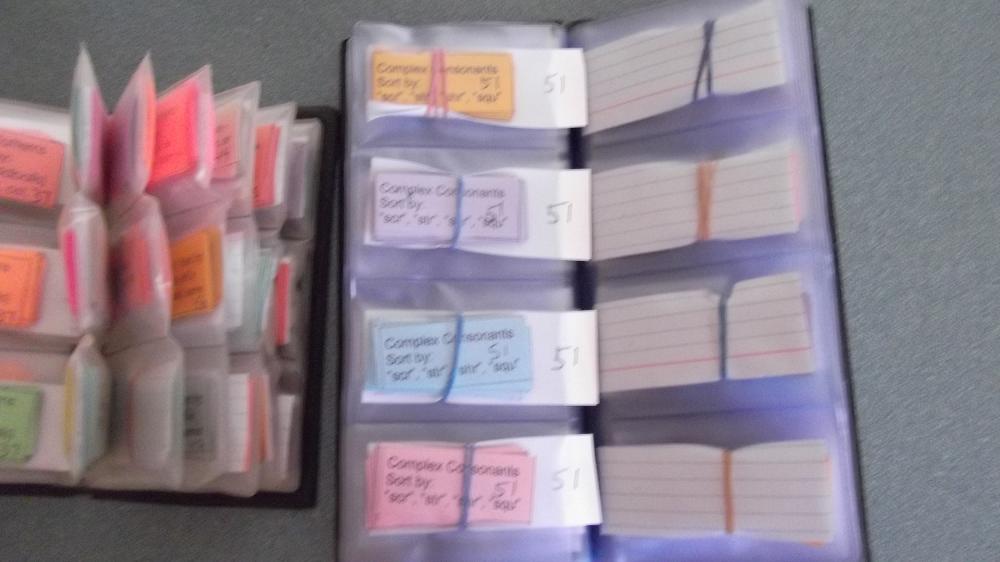
This summer, my mom helped me cut out my set and organize them. She added the number for the sort on the back of each card, cut them apart and secured them with a rubber-band.

My dad had a business card holder that he was no longer using, which I put the cards in. To make it easier to take the cards in and out of this, I added an index card, which I cut down to size. I made sure it stuck out of the plastic, as a tag students can grab.

In the future, I may only make 3 of these copies for each sort. I would have the students work in pairs at a word study station with 2 of the copies. I plan to add magnetic tape to one set of cards for each sort, so students can sort on the side of a heater or file cabinet. I would have copies on plain paper that students can take home for further practice.


Monday, May 27, 2013

Brine Shrimp Hatching Lesson


Lesson: Brine Shrimp Hatching - Taught February 19, 2013

Objective:
Work collaboratively with other students to set up a controlled experiment to answer the question:
What is the optimum salinity (salt level in water) for brine shrimp eggs to hatch?

EALRs:
4-5 INQB Investigate (Inquiry) Scientists plan and conduct different kinds of investigations, depending on the questions they are trying to answer.
4-5 LS1C (Life Science) Certain structures and behaviors enable animals to respond to changes in their environment.

Anticipatory Set: Looking at Brine Shrimp Eggs in their dormant stage using a magnifying glass.
-Prepared in advance 28 cups and lids w/ 1 mini-spoon of brine shrimp eggs and a magnifying glass.
“What do these brine shrimp eggs need to hatch?”

Activities:
In Science Journals:
1. Discuss the Question, Background Research, and Hypothesis students started last week.
2. Distribute copies of Materials List and Procedure for the Investigation (see attached).
3. Students identify controlled variable, manipulated variable and responding variable.
4. Preview the list of procedures/ directions.

Label cups (Pre-prepared labels)

Distribute salt (Pre-prepared: cups of salt w/ 5ml spoons)
Students put in the correct amount of salt in each cup
Line the cups up in order and take a picture with iPod
iPods go in “Time out tubs” and put to the side for next step

Restate: “What type of variable is the water?” (controlled)
“IMPORTANT: only 150 ml of water in each cup. How much?”
Distribute water
(Pre-pared: cups of water, 150 ml measuring cups, stirring rods)
Students pour in 150 ml of water in each cup and stir
Line the cups up in order and take a picture with iPod
iPods in “Time out tubs” and put to the side for next step

Store cups on trays in the window for follow up next few days.

Conclusion:
“What type of experiment are we conducting?”
“What question are we trying to answer?”

If time: Set up Science Journals to Record Data for the next 2 days.

-HANDOUT-
Materials:

Brine Shrimp Eggs (______________________   variable)

Salt                          (______________________   variable)

Water                       (______________________   variable)
4 congruent cups with lids
Labels
Magnifying glass
5ml spoon to measure salt
100 ml measuring cup to measure water
Camera (optional)

Procedure:

Getter # 1 – Get Tray
1.     Tape brine shrimp eggs sample in Science Journals.
      Put 1 mini-spoon of brine shrimp eggs in each cup (already done).

Getter #2 – Get Salt with 5 ml spoon
2.     Label the cups and ADD SALT in varying staged amounts:
Cup 1: 0 spoonfuls of salt (0 ml)
Cup 2: 2 spoonfuls of salt (10 ml)
Cup 3: 4 spoonfuls of salt (20 ml)
Cup 4: 6 spoonfuls of salt (30 ml)
      LINE CUPS UP AND TAKE A PICTURE
      PUT iPods in TIME OUT TUBS AND PUT OFF TO THE SIDE

Getter #3 – Get Water and Measuring Cup
3.     Add 150 ml of water to EACH cup
     Gently swirl to dissolve the salt.
LINE CUPS UP AND TAKE A PICTURE

Returner –
4.     Put Lids on and store the cups in a safe place.
Clean up other materials

5.     Record results on Day 2 and Day 3


POST LESSON REFLECTION:
This was a very successful lesson. The students were engaged throughout the lesson. The time and forethought I put into prepping the lesson paid off! If I were to teach this lesson again, I would definitely prep the materials in advance, as I did this time. It saves so much time in the distribution process. I would also use the same handout as it laid out clear and specific tasks for the students.

Looking back, it probably would have been better to use the doc cam to show students how to measure the salt, especially the process of starting on the flat edge to scrape of the excess salt. I wasn't sure students would see the flat/ levelness of the spoon under the doc cam. If I were to teach this lesson again I would use the doc cam to show the process, and then walk the spoon around to show the flat level.

Here is the evidence I observed that I met my objective: When it was the students turn to work, I observed the majority of student taking turns (working collaboratively) to measure the salt and the water. Sometimes, a few students wanted to do most of the work and needed some gentle reminders to share responsibility. For instance, one student was trying to measure water for a second cup, although he had already measured water and the other students were asking for the opportunity to measure. Another student wanted to measure all the salt in the cup that required the most salt. They responded well to gentle reminders to work together.

For the controlled experiment portion I noticed the varying amounts of salt (manipulated variable)  in all the cups before the students took their first picture, and that all the cups had same amount of water (controlled variable) after they took their last picture. I can use their iPods as an assessment tool; to make sure they took the pictures, and that the measurements were correct. I may not have iPods in a future classroom, so I would have to take that into consideration if teaching this lesson in the future.

I decided to say "stop, freeze, look at me" just as they were beginning to measure the water rather than use the "scientists" signal, because most students were working well and I wanted to share a quick piece of information without disrupting their work too much ("DO put water in the cup labeled 0ml"). In other words, I did not want them to have to completely empty their hands to hear that tidbit of information. 

When I am not teaching science, I often use two signals to get students attention. Usually, I say"1, 2, 3 Eyes on me" Students say, "1,2 eyes on you, hands folded too." This is similar to the "Scientists?" cue as I can quickly scan the classroom and see who has their hands folded, which prevents students from playing with papers, etc. when I am giving instruction. Sometimes I say, "Stop, freeze, look at me" and I scan the room for eyes and no movement. I find that useful for giving quick information I may have forgotten to mention, or when I realize something should be clarified. I do need to work on making sure I have 100% of students' attention 100% of the time I ask for it, and I need to follow up with restating expectations when necessary. 

Another practice I have been implementing into my teaching purposely includes wait-time and choral responses. I will thrice ask a question that requires a one or two-word response. I tell students "Raise your hand if you know it. Don't blurt it out" between each time I ask the question, and I will raise my hand at this point. Then, I will say, "When I drop my hand, whisper it if you know it." This encourages all to participate, without being disruptive. 

During the lesson, I realized the salt was not going to dissolve with simple swirling. So, I would definitely plan to distribute Popsicle sticks as part of the lesson next time. 

After the lesson, I was able to repeat the procedure with a couple of students who had been pulled out. As a full time teacher, I would offer the opportunity to students who may have missed a lesson to repeat it during lunch recess, or before or after school. 

The students looked for the brine shrimp eggs to hatch over the following days. They did not notice anything until Friday. They were so small; the size of a comma. I had a hard time noticing them. If I were to teach this lesson in the future, I would actually teach it on a Friday, rather than a Tuesday to allow the brine shrimp time to hatch over the weekend. 

As a full time teacher, I plan to teach Science on Fridays. Students will think it is "Fun Friday" because science is so engaging. They might not realize how much they are actually learning!